Sam Lisbon trip
, in the group chat:
how does not mine work again
Support
Answers, and how to reach us
Can’t find what you need here? Email support@duefree.co.uk.
Help with the app
support@Tell us which phone you use and what happened, and add a screenshot if it helps. Please never send a password or card details.
How does splitting work?
Add friends by their @handle or their email address, or tap Scan in Add Friends to read their Duefree code. Once they accept your request, you can split bills with them one to one, or in a group you make for your household or a trip.
To split a bill you paid, choose who it’s for, then split it equally, by exact amounts, or by item: list what each person had, and the tax, tip, service charge or discount is shared in proportion to it. Amounts are kept in exact decimals. When a total doesn’t divide evenly, the odd pennies or paisa are shared out one at a time, so every share is within a penny or a paisa of its exact part, and Duefree’s server checks every bill so its shares add up to it exactly. Everyone else on the bill gets a notification, and everyone on a bill split by item sees its items.
The Split tab then shows one balance with each friend and each group, taking every open bill between you into account.
If you paid a bill and got something wrong, you can rename it, change its date or remove it, as long as nobody has settled or declined their share yet. The amount and the people on it can’t be changed, so remove the bill and add it again.
I can’t find a friend
Search needs their exact @handle or their exact email address: part of either finds nobody. If they signed in with Apple and chose to hide their email, Apple gives them a private relay address that you won’t know, so ask for their handle or scan their code instead, or ask them to send you a request. Their handle and their code are in Profile, under Handle and QR code, where they can choose a handle if they haven’t yet.
A handle found the wrong person
Check the name and photo before you add anyone: Duefree asks you to check a handle is theirs. If the handle you were given finds someone else, ask your friend for it again, or scan their code. If someone seems to be pretending to be another person, open the three dots beside them and choose Report.
A Duefree link opens the website instead of the app
Update Duefree first. On Android, open Settings, then Apps, Duefree, Open by default, and add duefree.co.uk. On an iPhone, Duefree’s links open the website for now: tap Open Duefree there. The website’s Open Duefree button works on both.
Is there a limit on bills?
There’s no daily cap on bills. Shared bills have an hourly limit, to stop abuse.
Do I have to pay to split bills?
No. Splitting, settling up, reminders, tracking, budgets and stats are free today. Duefree Plus is optional and adds Duefree AI Plus, goals and premium themes: see What Duefree Plus is.
Does everyone need the app?
Yes. Everyone on a bill needs a Duefree account, so they can see their share, decline it with “Not mine” or record that they’ve settled up. Add them by their @handle or the email address they signed up with, and once they accept your request you can split bills with them.
Can I split a bill unevenly?
Yes. Choose Exact and type what each other person owes; your own share is what’s left of the total, and Duefree stops you if their shares come to more than the bill. Use it, for example, when one housemate has the bigger room, or when you and your partner split bills by what you each earn. For a meal or a shop where people had different things, choose By item and list what each person had.
Can I split the rent every month?
Yes. Whoever pays the rent adds it as a new bill each month. Bills don’t repeat by themselves.
What happens when a housemate moves out?
They can leave the group once every bill between them and the others in it is settled. In a group with simplified debts, they can leave once their group balance is settled and their bills there have closed, which happens within 4 days; the group’s page says from which day. The bills they were on stay in the group.
What are simplified debts in a group?
The person who made a group can turn on Simplify debts from the group’s options, for everyone in it. Duefree then works out the fewest payments that settle the group, so each person sees one group balance and who to pay, or who pays them, which can be someone they never shared a bill with. Pay them however you usually do, then tap Record payment: a payment is recorded in full, and it counts towards the whole group.
So everyone can check where those payments come from, every member can see every bill that has counted in the group balance under Other bills in this group, bills they aren’t on included: its title, amount, dates, who paid it and who is on it, never each person’s share or its items. Anyone in the group can report a bill there. A bill counts in the group balance as soon as it’s added, and someone on it can still mark it Not mine until their share closes, which can take 4 days. The person who made the group can turn simplified debts off again. Duefree never converts, so each currency has its own group balance.
Does Duefree convert currencies?
No. Your currency is set in Profile: your own entries and the bills you pay are in it. Each shared bill keeps the currency it was added in, and everyone on a bill needs to use that currency, so a bill is one amount in one currency for everyone on it. Duefree never converts: if you and a friend have bills open in two currencies, you see each one apart. So on a holiday abroad, add each bill in the currency you all use at home, at what it cost in that currency.
Why did my balance change after the update?
Home’s balance is now what’s in hand. A shared bill you paid comes off it in full, and it goes back up as friends pay you back; what’s still to collect and to pay is shown beside it. Your share of a bill someone else paid counts in your spending. So the figure moves once when you update, and a phone still on an older version of Duefree shows a different one.
Why is 84.50 + 15% 97.175?
Duefree works sums out the way a phone’s calculator does: after + or −, a percent is worked out on the figure before it, so 84.50 + 15% adds 15% of 84.50. You see the exact answer, and the figure rounded for money when you log it. Sums typed into Quick Capture are free; in Duefree AI Plus they are part of Plus.
Why did a budget alert come after a friend’s bill?
Your share of a bill someone else added counts in your spending, so it can take a budget to 80% or 100%. Duefree works the alert out on your phone and says each level once a month. To turn the alerts off, open Profile and switch off Budget alerts in the app.
Can Duefree work out who pays whom after a trip?
Yes, for free. In Quick Capture, type who paid what, such as “Ravi 40, Zoe 25, me 35”, and Duefree works out each person’s share and the fewest payments that square everyone up. It saves nothing: add the bills when you’re ready.
Can I make my own categories?
Yes, for free. Open Profile, then Categories, and make up to 20 spending and 20 income categories of your own, each with its own icon. You can file your share of a shared bill under one of your spending categories too. Nobody else sees them.
Do I have to describe every entry?
No. A description is optional, and an entry without one is shown by its category. A shared bill still needs a title, because everyone on it sees it.
What does “Not mine” do?
If someone puts you on a bill that isn’t yours, open the bill, or find it on that friend’s or group’s page, and tap “Not mine” on your share, then confirm. Your share closes and the person who paid is told.
Nobody pays a declined share. It’s recorded as declined, not as settled, and it no longer counts in your balance with the person who paid.
Once anyone has declined their share, the bill can’t be edited or removed, so there’s always a record of it.
What the person who paid sees
Duefreenow
Ana Souza says “Big shop” isn't theirs. Their £21.02 share no longer counts as owed to you.
Is settling up a payment?
No. Settling up in Duefree is a record. Duefree never pays, transfers or holds money.
Pay each other however you usually do, by bank transfer, UPI, cash or any app. Then record it in Duefree:
- Settle with a friend records that everything open between you is settled, or everything open between you in one group. Duefree nets the bills in both directions and records one payment for the difference.
- Close one share. If you paid a bill, you can close one person’s share of it when they pay you back for just that bill.
- Bills that cancel out close with no payment recorded, because no money needs to move.
Duefree
Keeps the record.
Who paid, who’s on each bill and who has settled up, with one balance for each friend and each group.
Your bank or payment app
Moves the money.
Duefree never pays, transfers or holds money. Settling up in Duefree is a record, not a payment.
When you record a payment, the other person is told that you recorded it, and the activity feed shows who recorded what. Bills that cancel out close quietly. Duefree can’t see your bank, so a recorded payment is what one of you told it, not proof that money moved.
How do reminders work?
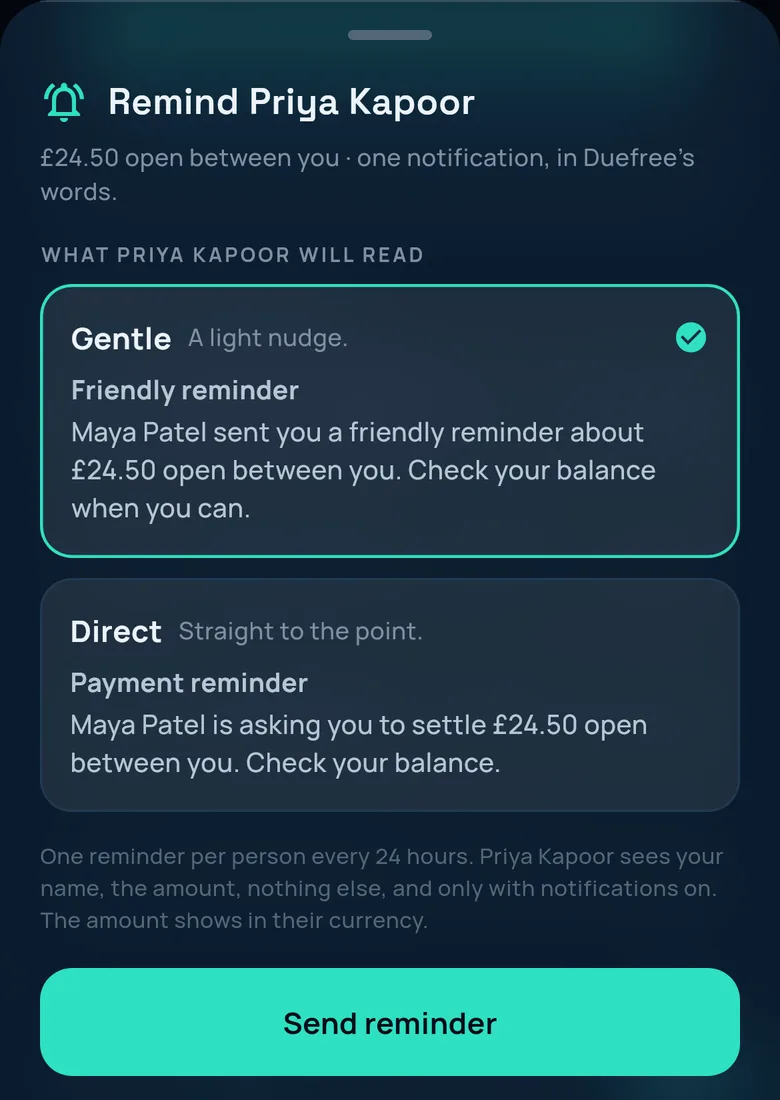
When your open bills with a friend leave you owed money overall, you can send them a reminder from their page, or from the bell beside Settle in a group. Pick a gentle or a direct tone. Before you send it, Duefree shows you the notification they’ll get, word for word. They see the amount in the currency of the bills, with nothing converted.
You can send each person one reminder every 24 hours, and 20 a day in all. Only the person who is owed money overall can send one.
Gentle
Duefreenow
Maya Patel sent you a friendly reminder about £24.50 open between you. Check your balance when you can.
Direct
Duefreenow
Maya Patel is asking you to settle £24.50 open between you. Check your balance.
How do I block or report someone?
Open their page: tap them on the Split tab, in a group, or under My friends in Add or manage friends. Then tap the three dots at the top, and choose Block or Report. A friend request you’ve received has the same three dots beside it, with Decline: block or report before you decline, because after that the request is gone.
When you block someone, they can’t send you friend requests or reminders, add you to a group, or put you on a bill, and any request between you goes. If nothing is open between you, you stop being friends. They aren’t told. Bills already open between you stay, so either of you can still settle up or tap Not mine. To unblock someone, open Profile, then Blocked people.
To report a bill, open it and tap the three dots. In a group with simplified debts, you can also report a bill you aren’t on from Other bills in this group, on the group’s page. To report a group, open it, tap the three dots beside its name, then Report group. To report a Duefree AI Plus reply, press and hold it and choose Report this reply, or tap the three dots at the top of Duefree AI and choose Report a problem. Reports go to Duefree’s developer, never to the person or group you report, though what we do about a report can show that someone reported it. Duefree has no tolerance for abuse, and we act on reports within 24 hours. If anyone is in danger, contact the emergency services first.
What is Duefree Plus?
Plus adds three things to the free app:
- Duefree AI Plus, an assistant that runs on your phone. Each day it opens on what changed in your money, and it answers questions from your own numbers, works out sums exactly and tells you whether you can afford something from what you’ve logged. It talks the way you choose: Friendly, or Brutal, which roasts your spending and swears. It can suggest an entry, a split, a settlement, a reminder to a friend, a budget, a category or a goal, and saves or sends nothing until you confirm it. On phones that can, send it a photo, with a note if you like: it reads a receipt or a payment for you to log or split, works out a sum, or talks with you about anything else in the photo. It remembers what you tell it about yourself, which you can change or forget, and on Android phones that can, you can speak to it instead of typing. Your questions never go to an AI server.
- Goals: type what you want, tap When can I have it?, and Duefree works out from your own spending when it’s yours and what would bring it closer, then shows what moved it each time you log. With Duefree AI on your phone, you can photograph a price tag instead of typing. It’s an estimate from what you’ve logged.
- Premium themes: five more colours for the whole app.
Tracking, splitting, settling up, budgets, stats and notifications are free today. Plus is billed monthly or yearly through Google Play or the App Store, with a free trial where the store offers one. The store shows the price and when it renews before you confirm.
Plus belongs to your Duefree account, not to one phone, so it comes with you when you sign in on another phone, Android or iPhone.
How do I cancel Plus?
Cancel it in the store you bought it from. Deleting the app doesn’t cancel it. Once you’ve cancelled, Plus stays on until the end of the period you’ve paid for, and it won’t renew.
Google Play
In Duefree, open Profile, then Plan & billing, then Manage in Google Play. Or:
- Open the Play Store app.
- Tap your profile picture, then Payments & subscriptions, then Subscriptions.
- Choose Duefree Plus, then Cancel subscription.
App Store
In Duefree, open Profile, then Plan & billing, then Manage in the App Store. Or:
- Open Settings on your iPhone.
- Tap your name, then Subscriptions.
- Choose Duefree Plus, then Cancel Subscription.
How big is the Duefree AI download? Plus
Plus
About 3.7 GB, downloaded once. It starts by itself the first time you open Duefree AI, on whatever connection you have, so open it first on Wi-Fi: it can use up a mobile data allowance. Your phone needs about 6.3 GB free for it: the model, and what it builds on the phone the first time it loads.
On Android, allow Duefree’s notifications and the download can keep going in the background.
After that, the assistant runs on your phone. Your questions never go to an AI server, and nor do its answers. Like the rest of the app, it still needs a connection to read and save your entries.
Answers can take several seconds, because the model runs on the phone itself. Duefree AI needs a 64-bit phone with at least 8 GB of memory, so it doesn’t run on every phone: Duefree checks before it downloads anything, and says so if yours can’t run it. Reading photos and speaking to it aren’t available on every phone either: speaking needs an Android phone, with Android 13 or later, that can turn speech into text on the phone.
What does Duefree AI remember about me? Plus
What you tell it about yourself that’s worth keeping, such as “Jordan is my flatmate” or “I get paid on the 28th”. It keeps it quietly, without asking, and carries on the conversation. That includes something sensitive, such as something about your health, your beliefs or a relationship ending, so tell it only what you’re happy for it to keep. You can also ask it in so many words, starting with “Remember that”. The first time, it asks you one thing, how it should talk, and remembers your answer on your account, or on your phone if you keep it there. It keeps up to 50 things. Open What I know about you from the top of Duefree AI to see them, change one, forget one, or forget everything.
That list is saved to your Duefree account, so it follows you to another phone. Choose Keep on this phone only there and it stays on that phone alone, with nothing on your account. Your figures aren’t on the list: Duefree AI reads them fresh from the app each time.
When you open Duefree AI after 30 minutes or more away, or tap the three dots at the top and choose New chat, the chat starts fresh and the one before it moves to Past chats, in the same menu. It keeps up to 30, newest first, each named after the first thing you typed in it, or the photo you sent if you typed nothing: open one to read it and carry on, or delete it. Come back within 30 minutes and you carry on where you left off, and a receipt you haven’t saved is never cleared without asking. Your chats are kept on your phone and never uploaded unless you report a reply. To delete them all, choose Clear conversations in the same menu. Closing your account in the app deletes what Duefree AI knows about you and, on that phone, your chats.
Why does Duefree AI say a figure isn’t in my data? Plus
Duefree AI’s replies are written by an AI model on your phone, and a model can get a figure wrong. So Duefree checks the figures in a reply against your own entries, and against what you typed. A sentence with a figure it can’t find there is left out, or a note under the reply says the figure isn’t in your data, so you know to check it before you rely on it. The figures on Duefree AI’s cards are worked out by the app itself, from your entries.
Does Duefree AI give financial advice? Plus
No. It describes your own numbers: what you’ve spent, what’s open with friends, and when a goal can be yours. Ask it about a money product, such as an investment, a loan or a pension, and it says it doesn’t give financial advice. When you ask whether you can afford something, its answer is worked out from what you’ve logged and your goals: a figure, not advice. For advice, talk to a regulated adviser.
How do I report a Duefree AI reply? Plus
Press and hold the reply, then choose Report this reply. Or tap the three dots at the top of Duefree AI and choose Report a problem, and say what went wrong. The reply and your question before it go to Duefree’s developer with your report; for something it read from a photo, what it read from the photo too, never the photo itself. Nothing else from the conversation is sent.
Which phones does Duefree work on?
Duefree is made for Android phones and iPhones. Coming soon to Android and iPhone. On Android it needs Android 11 or later, and on iPhone iOS 15 or later.
To reach the same account on another phone, sign in the same way you did before: the same email, Google account or Apple ID. Signing in another way can give you a separate account. Sign in with Apple is offered on iPhone only.
What doesn’t Duefree do?
Some money apps do things Duefree never will. Here’s the list.
- Never lends money. It only records bills between you and the people you share them with.
- Never runs checks on you. It asks for no ID. You sign up with an email address, a Google account or, on an iPhone, your Apple account.
- Never reads your phone’s SMS or contacts. The app doesn’t ask for either. You add friends by their @handle or their email address.
- Never asks for your bank login. Duefree never connects to your bank.
- Never moves money. You pay each other however you usually do, by bank transfer, UPI, cash or any app. Duefree only keeps the record.
How do I delete my account?
In the app, open Profile and tap Close account, at the bottom of the tab. Two things must be true first, and Duefree tells you if they aren’t:
- Every shared bill between you and anyone else is settled, in a group or not, and in a group with simplified debts your group balance is settled and your bills there have closed, within 4 days. A bill that was never yours can be declined with Not mine instead.
- Your Plus subscription has stopped billing. Cancel it in the store first. A subscription you’ve already cancelled doesn’t block deletion, but the rest of its paid period is lost.
Deleting removes your own entries, budgets, categories, goals and handle, what Duefree AI Plus knows about you, your friendships, blocks and group memberships, and your sign-in. On bills your friends keep, your name becomes “Deleted User”, so their records still add up. A record of any Plus purchase is kept, no longer linked to your name or email, and a record of any bill you were on that its payer removed stays for the other people on it.
Can’t use the app? See how to delete your account without it.
How do I contact support?
Email support@duefree.co.uk. Tell us which phone you use and what happened, and add a screenshot if it helps. Please never send a password or card details.
For press and anything else, email hello@duefree.co.uk. Duefree is made by Aman Jaiswal, an independent developer in the UK.
Write to Duefree
- Help with the app
- support@duefree.co.uk
- Press and anything else
- hello@duefree.co.uk
- Your data
- privacy@duefree.co.uk
How do I make a data protection complaint?
Email privacy@duefree.co.uk and tell us what your complaint is about. We’ll acknowledge it within 30 days, look into it, and tell you what we found and what we’ve done about it.
You also have the right to complain to the Information Commissioner’s Office (ICO), the UK’s data protection regulator: ico.org.uk/make-a-complaint. If you live elsewhere, you can complain to the data protection authority where you live.
To see what data Duefree holds and your other rights, read the privacy policy.